
Next-gen AI-Powered OCR Platform
Efficient, Accurate, and Secure
AI Data Extraction
Data extraction made easy with AI-powered OCR through a no-code platform or API integration.
Extract faster with 99% accuracy while saving cost.
See how Valitract works
Powerful OCR with
AI-Based Data Extraction
Smart data extraction
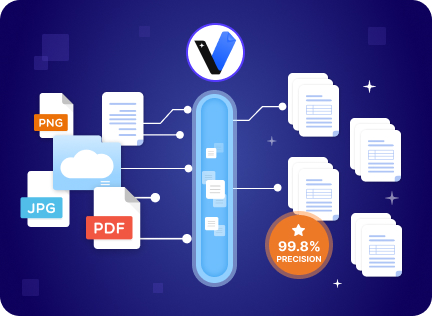
Leverage AI-powered smart data extraction to effortlessly handle unformatted documents. Our fully automated system handles everything, from parsing and validating to extracting data accurately with up to 99.8% precision.
Customizable data fields & labels
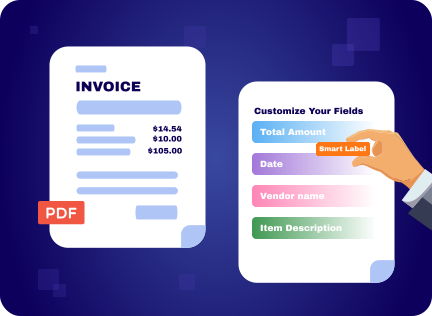
Simplify document extraction with customizable data fields and labels tailored to your needs. Whether you want us to handle the entire extraction process or select specific fields, we’ve got you covered.
Any Doc, Any Language
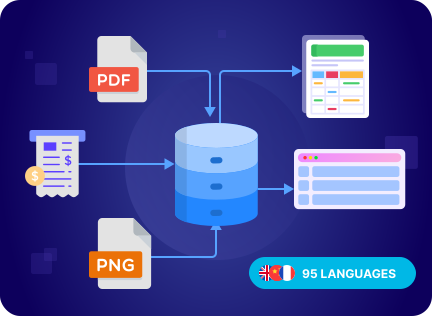
Effortlessly extract data from images and documents in any language. Our OCR system supports over 95 languages and processes various input types, including PDFs, images, screenshots, scans, and more, making it ideal for global businesses
Ready-to-use data output
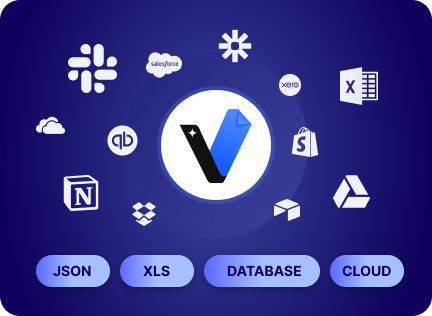
Receive extracted data in structured formats such as JSON, XLS, or CSV, ready for seamless integration with databases, analytics tools, or other applications.
No-code Platform
Interact with our solution effortlessly through simple clicks. No coding or complex configurations required unless you want to.
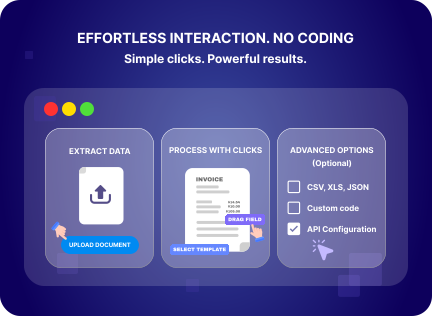
AI-Powered OCR: Accurate, Flexible, and Secure
Document Processing That Actually Works
Industry-leading accuracy on complex documents, or we’ll credit your next batch. Built to handle your most challenging formats.

Giang Nguyen
COO at GDS BPO Service
Valitract changed what we can promise our clients. We now compete on speed and precision in a way we simply couldn’t before.
Simple, Flexible Plans
Flexible monthly plans with clear volume tiers. Choose what fits your needs, from Start to Enterprise scale.

Sara Pendas
HR Director at HRI
Valitract’s simple and flexible pricing plan was a breath of fresh air. We only pay for what we actually use, without being locked into a rigid, expensive tier.
Your Data Stays Confidential, Always
Enterprise-level security protocols. Automatic data purge. Your data is never used to train our models.

John
Data Engineer at DocAI
Valitract gave our security compliance team complete peace of mind, and let me focus on building clean pipelines knowing our data is fully protected at every step.
Intelligent OCR for All Document Types
Say goodbye to manual entry! Valitract transforms any document types into valuable and actionable data.
Invoices
Capture vendor details, line items, totals, and payment terms from any invoice format
Receipt
Extract merchant, itemized purchases, and transaction dates from any receipt, even the handwritten
Bank Statement
Extract transactions, account details, and balances from any bank statement format
Passport
Read MRZ codes, personal details, and expiry dates instantly, remove manual entry from your KYC
Resume / CV
Pull contact details, work history, skills, and education straight into your ATS or HR database automatically
ID Card
Capture names, ID numbers, and dates of birth from national ID cards across formats and countries
The easiest AI-powered OCR API to use
Once you sign up with a business email, click on My Account > API Keys to get your key.
This key will allow you to authenticate API requests.
import java.io.*;
import java.net.*;
import org.json.*;

public class ValitractOCR {
  private static final String API_KEY = "your_api_key_here";
  private static final String API_URL = "https://api.valitract.com/api/v1/extract-generic";

  public static void main(String[] args) {
    try {
      File file = new File("document.pdf");
      String result = processOCR(file);
      System.out.println("Extracted Data: " + result);
    } catch (Exception e) {
      e.printStackTrace();
    }
  }

  public static String processOCR(File file) throws Exception {
    HttpURLConnection conn = (HttpURLConnection) new URL(API_URL).openConnection();
    conn.setRequestMethod("POST");
    conn.setRequestProperty("Authorization", "Bearer " + API_KEY);
    conn.setDoOutput(true);

    // Upload file and get response
    return "JSON Response";
  }
}
package main
import (
"bytes"
"encoding/json"
"fmt"
"io"
"mime/multipart"
"net/http"
"os"
)
const (
apiKey = "your_api_key_here"
apiURL = "https://api.valitract.com/api/v1/extract-generic"
)
type OCRResponse struct {
FileName string `json:"file_name"`
ExtractedData map[string]interface{} `json:"extracted_data"`
}
func processOCR(filePath string) (*OCRResponse, error) {
file, err := os.Open(filePath)
if err != nil {
return nil, err
}
defer file.Close()
body := &bytes.Buffer{}
writer := multipart.NewWriter(body)
part, _ := writer.CreateFormFile("file", filePath)
io.Copy(part, file)
writer.Close()
req, _ := http.NewRequest("POST", apiURL, body)
req.Header.Set("Authorization", "Bearer "+apiKey)
req.Header.Set("Content-Type", writer.FormDataContentType())
client := &http.Client{}
resp, err := client.Do(req)
if err != nil {
return nil, err
}
defer resp.Body.Close()
var result OCRResponse
json.NewDecoder(resp.Body).Decode(&result)
return &result, nil
}
func main() {
result, err := processOCR("document.pdf")
if err != nil {
fmt.Println("Error:", err)
return
}
fmt.Printf("Extracted Data: %+v\n", result)
}const axios = require('axios');
const FormData = require('form-data');
const fs = require('fs');
const API_KEY = 'your_api_key_here';
const API_URL = 'https://api.valitract.com/api/v1/extract-generic';
async function processOCR(filePath) {
try {
const form = new FormData();
form.append('file', fs.createReadStream(filePath));
const response = await axios.post(API_URL, form, {
headers: {
'Authorization': `Bearer ${API_KEY}`,
...form.getHeaders()
}
});
console.log('Extracted Data:', response.data);
return response.data;
} catch (error) {
console.error('Error processing OCR:', error.message);
throw error;
}
}
// Usage
processOCR('document.pdf')
.then(data => console.log('Success:', data))
.catch(err => console.error('Failed:', err));<?php
define('API_KEY', 'your_api_key_here');
define('API_URL', 'https://api.valitract.com/api/v1/extract-generic');
function processOCR($filePath) {
if (!file_exists($filePath)) {
throw new Exception("File not found: $filePath");
}
$ch = curl_init();
$cfile = new CURLFile($filePath, mime_content_type($filePath), basename($filePath));
$data = [
'file' => $cfile
];
curl_setopt_array($ch, [
CURLOPT_URL => API_URL,
CURLOPT_POST => true,
CURLOPT_POSTFIELDS => $data,
CURLOPT_RETURNTRANSFER => true,
CURLOPT_HTTPHEADER => [
'Authorization: Bearer ' . API_KEY
]
]);
$response = curl_exec($ch);
$httpCode = curl_getinfo($ch, CURLINFO_HTTP_CODE);
curl_close($ch);
if ($httpCode === 200) {
return json_decode($response, true);
} else {
throw new Exception("API Error: $response");
}
}
// Usage
try {
$result = processOCR('document.pdf');
echo "Extracted Data:\n";
print_r($result);
} catch (Exception $e) {
echo "Error: " . $e->getMessage();
}
?>import requests
import json
API_KEY = 'your_api_key_here'
API_URL = 'https://api.valitract.com/api/v1/extract-generic'
def process_ocr(file_path):
"""
Process OCR on a document using Valitract API
Args:
file_path (str): Path to the document file
Returns:
dict: Extracted data from the document
"""
headers = {
'Authorization': f'Bearer {API_KEY}'
}
with open(file_path, 'rb') as file:
files = {
'file': (file_path, file, 'application/pdf')
}
try:
response = requests.post(API_URL, headers=headers, files=files)
response.raise_for_status()
result = response.json()
return result
except requests.exceptions.RequestException as e:
print(f'Error processing OCR: {e}')
raise
# Usage
if __name__ == '__main__':
try:
data = process_ocr('document.pdf')
print('Extracted Data:')
print(json.dumps(data, indent=2))
except Exception as e:
print(f'Failed to process document: {e}')require 'net/http'
require 'uri'
require 'json'
API_KEY = 'your_api_key_here'
API_URL = 'https://api.valitract.com/api/v1/extract-generic'
def process_ocr(file_path)
uri = URI.parse(API_URL)
File.open(file_path, 'rb') do |file|
request = Net::HTTP::Post.new(uri)
request['Authorization'] = "Bearer #{API_KEY}"
boundary = "-----------RubyMultipartBoundary"
request['Content-Type'] = "multipart/form-data; boundary=#{boundary}"
post_body = []
post_body << "--#{boundary}\r\n"
post_body << "Content-Disposition: form-data; name=\"file\"; filename=\"#{File.basename(file_path)}\"\r\n"
post_body << "Content-Type: application/pdf\r\n\r\n"
post_body << file.read
post_body << "\r\n--#{boundary}--\r\n"
request.body = post_body.join
response = Net::HTTP.start(uri.hostname, uri.port, use_ssl: true) do |http|
http.request(request)
end
if response.code == '200'
JSON.parse(response.body)
else
raise "API Error: #{response.body}"
end
end
end
# Usage
begin
result = process_ocr('document.pdf')
puts "Extracted Data:"
puts JSON.pretty_generate(result)
rescue StandardError => e
puts "Error: #{e.message}"
endusing System;
using System.IO;
using System.Net.Http;
using System.Net.Http.Headers;
using System.Threading.Tasks;
using Newtonsoft.Json;
namespace ValitractOCR
{
public class OCRClient
{
private const string API_KEY = "your_api_key_here";
private const string API_URL = "https://api.valitract.com/api/v1/extract-generic";
public static async Task<string> ProcessOCR(string filePath)
{
using (var client = new HttpClient())
{
client.DefaultRequestHeaders.Authorization =
new AuthenticationHeaderValue("Bearer", API_KEY);
using (var form = new MultipartFormDataContent())
{
var fileContent = new ByteArrayContent(
File.ReadAllBytes(filePath)
);
fileContent.Headers.ContentType =
MediaTypeHeaderValue.Parse("application/pdf");
form.Add(fileContent, "file", Path.GetFileName(filePath));
var response = await client.PostAsync(API_URL, form);
response.EnsureSuccessStatusCode();
var result = await response.Content.ReadAsStringAsync();
return result;
}
}
}
public static async Task Main(string[] args)
{
try
{
var result = await ProcessOCR("document.pdf");
Console.WriteLine("Extracted Data:");
var formatted = JsonConvert.DeserializeObject(result);
Console.WriteLine(
JsonConvert.SerializeObject(formatted, Formatting.Indented)
);
}
catch (Exception ex)
{
Console.WriteLine($"Error: {ex.Message}");
}
}
}
}Get your free API Key
Start for free with complimentary credits and dedicated developer support to help you get set up quickly.
Frequently asked question
Find quick solutions to common queries and get the most out of your learning experience
There are various software tools for data extraction including Python libraries, specialized ETL tools, and custom solutions depending on your specific needs and data sources.
Data extraction allows you to consolidate that information into a centralized system in order to unify multiple data sets.
Yes, Excel can be used for basic data extraction tasks, though it has limitations compared to specialized tools.
There are many free tools available including Python libraries, open-source ETL tools, and free tiers of commercial products.
OCR technology can process various document types including scanned images, PDFs, and photos.
Most systems support CSV, Excel, PDF, JSON, XML, and common image formats.
Modern AI-powered OCR can read clear handwriting, though accuracy varies based on quality.